Ledge: a free, open-source notch app for MacBook
Ledge is a macOS app that turns the black notch on a MacBook into a small live status area, similar to the iPhone's Dynamic Island. It shows what is playing, a running timer, your next meeting, the weather, notes, and replaces the volume and brightness pop-ups. It is free, open source under GPL-3.0, has no account and no telemetry, and needs a MacBook with a notch on macOS 26 or later.
What it does
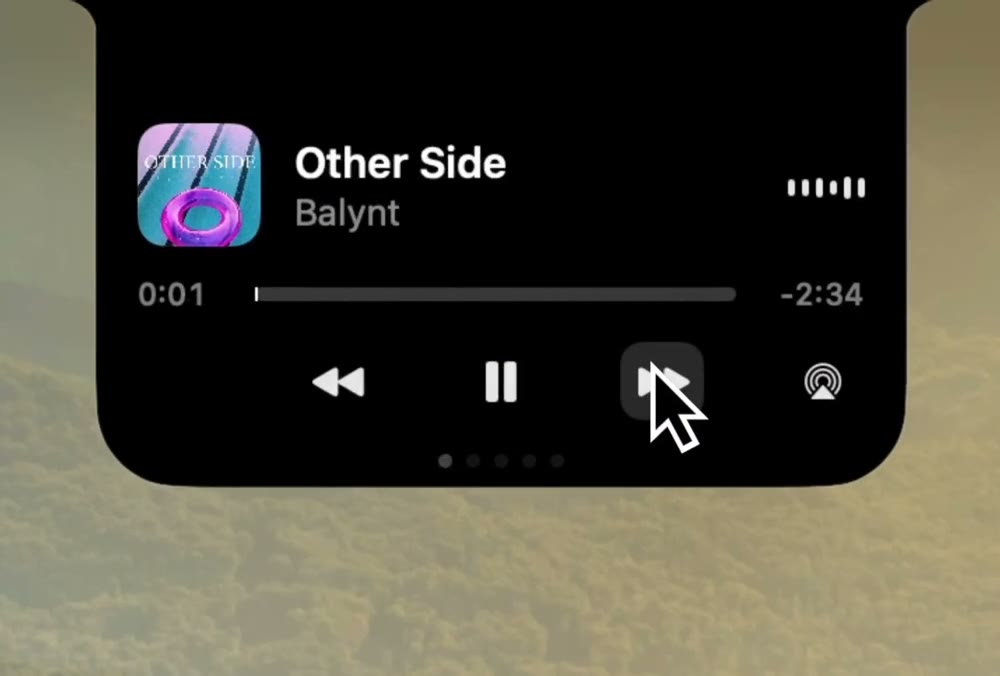
- Now playing. Cover art, title, scrub bar and playback buttons for Apple Music, Spotify, and audio playing in a browser tab. You can send the sound to AirPods or another AirPlay output from the same card.
- Timer. Start a focus session and the countdown sits beside the notch while you work.
- Calendar. Your next events beside a month grid. When a meeting is about to start, the Join button gets a camera mirror so you can check yourself before joining.
- Weather. Current conditions and the next few hours, for your location or a city you type in.
- Notes. Your five most recent notes on a card; each opens in its own window, is stored as a plain file on your Mac, and can be sent to Apple Notes.
- Keep Awake. Off by default. Keeps the Mac and the screen awake until you stop it, like the
caffeinatecommand. A further setting keeps the Mac running with the lid closed (details below). - Volume and brightness. A readout in the notch replaces the grey macOS pop-up; hover it and it becomes a slider.
- AirPods and Bluetooth. Connections with battery level.
- Battery, Focus modes, Caps Lock and keyboard layout, camera and microphone in use. Small notices where you are already looking.
- File shelf. Drop files on the notch and drag them out later; new screenshots land there automatically.
Every feature can be switched off on its own, and a feature that is off does no work and asks for no permission.
Who it is for
People with a notched MacBook who want the notch to show useful status (music, timers, meetings) without paying for a notch app or handing one an account, and people who want to read the source of an app that sits on top of everything they do.
It is not for you if you want the notch area on an external monitor or a Mac without a notch, or if you are on macOS 15 or earlier: Ledge draws only on a notched built-in display and requires macOS 26.
Requirements
| Mac | A MacBook with a notch: 14-inch or 16-inch MacBook Pro (2021 and later), MacBook Air (2022 and later) |
|---|---|
| macOS | macOS 26 or later |
| Price | Free. Optional donations via Buy Me a Coffee. |
| License | GPL-3.0 |
| Account | None |
| Distribution | Notarized DMG from GitHub Releases or ledgeapp.dev; updates through Sparkle. Not on the Mac App Store. |
Install
- Download Ledge.dmg.
- Drag Ledge into Applications.
- Open it from Finder, not from a terminal. macOS gives permissions to whatever launched the app, so starting it from a terminal would hand them to the terminal.
Ledge has no Dock icon; the notch is the app. Opening it again from Finder or Spotlight brings up its Settings, where you will also find Check for Updates… and Quit (under General).
To build it yourself: git clone https://github.com/egemertbalcik/Ledge.git, then make run (needs Swift 6.2 and an Apple Development signing identity).
Privacy
- Records nothing. No screen capture, no audio capture, nothing saved from the camera. The camera opens only when you press the mirror on the Join button.
- The music equalizer does not listen. It is an animation seeded from the track and reads no audio.
- Stays out of screenshots, recordings and screen sharing by default; there is a switch to show it.
- Four network requests, nothing else: weather from Open-Meteo (coordinates rounded to about a kilometre), the place name from Apple, cover art for what is playing, and the update check. No telemetry.
Permissions, and what happens if you say no
Nothing is requested at launch. Each permission is asked for by the one feature that needs it, from the Permissions tab in Settings.
| Permission | Used for | If you say no |
|---|---|---|
| Accessibility | Replacing the system volume and brightness pop-up | You see both, stacked |
| Automation | Cover art and scrubbing in Music and Spotify; sending a note to Apple Notes | Music still shows, without artwork; notes stay in Ledge |
| Calendars | Next event and the month | No calendar card |
| Camera | The mirror on the Join button | No mirror; Join still works |
| Bluetooth | Instant connection notices, AirPods proximity | Still shown, a moment later |
| Focus status | Showing when a Focus turns on, and staying quiet during it | Ledge's notices come through during a Focus |
| Location | Local weather | Weather for a city you type |
| Login Items | Keep Awake's lid-closed helper | Keep Awake still works with the lid open |
What it does that macOS does not allow publicly
You should know this before installing. Ledge is not sandboxed and cannot be sold on the Mac App Store. It uses three private Apple frameworks: DisplayServices for brightness, CoreBrightness to dim the keyboard light while the lid is shut, and MediaRemote to see what is playing in any app. Because macOS no longer lets ordinary apps read MediaRemote, Ledge loads a small library of its own into Apple's signed /usr/bin/perl and asks from there; the library only reports what is playing. Every private symbol is checked at runtime, so if Apple removes one, that feature stops instead of the app crashing. Any macOS update can break these parts.
Keep Awake's lid-closed setting installs a helper that runs as root, because only root can stop a MacBook sleeping when the lid closes. It is installed only when you turn that setting on and removed when you turn it off. It holds the Mac awake on a 90-second lease that Ledge keeps renewing, so if Ledge crashes or is quit, the lease runs out and the Mac is free to sleep again, with nothing to undo by hand.
Frequently asked questions
Is Ledge free?
Yes. It is free to download and use, with no trial, subscription or account. The source code is published under GPL-3.0.
Does Ledge work on an external monitor or a Mac without a notch?
No. Ledge draws only on the built-in display of a MacBook with a notch. If you need a notch-style area on an external display, see the comparison of notch apps; some of them support it.
Which macOS versions does Ledge support?
macOS 26 or later. It does not run on macOS 15 Sequoia or earlier.
Is Ledge on the Mac App Store or Homebrew?
Neither, as of October 2026. It is distributed as a notarized DMG from GitHub Releases and ledgeapp.dev, and updates itself with Sparkle.
Does Ledge record my screen or listen to my audio?
No. It captures no screen and no audio. The music visualizer is an animation, not an audio analyzer.